
Features
Everything Titanium does with a question.
An analyst working across all your sources at once: answers, live charts, dashboards, company rules, forecasts and documents. Always read-only.
Real screenshot
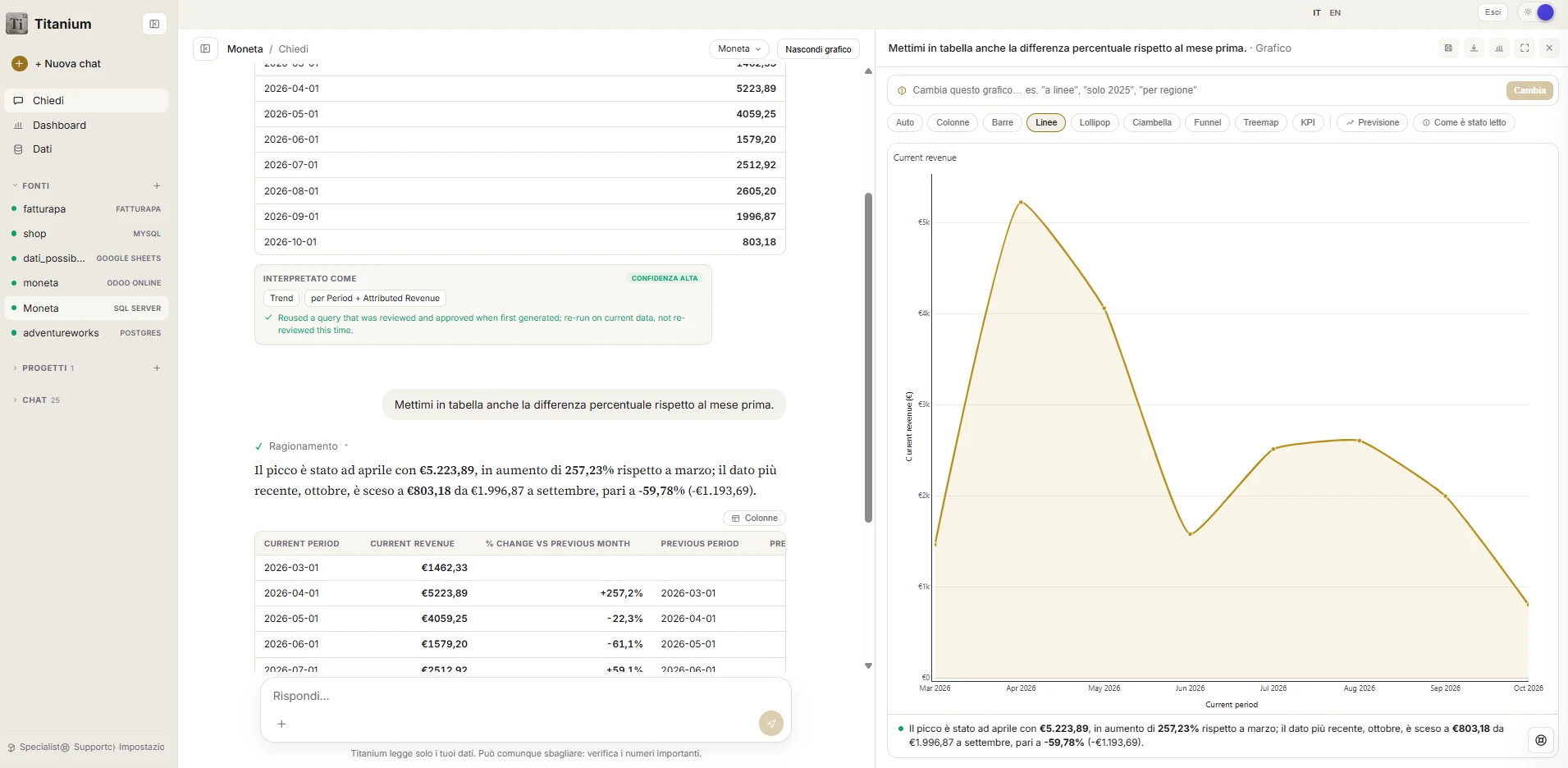
Ask, then keep asking.
“Add the percentage change on the previous month to the table too.” Titanium remembers the earlier question, updates the table and the chart, and explains what changed.
Ask
Questions and answers.
- A three-part answer
- The conclusion in one sentence, the figures written as a person would say them (€1.2M, not 1234567.89) and the chart.
- Any question
- Even one never foreseen, with no technical intervention.
- Italian and English on equal terms
- With amounts in the correct currency of the source.
- Total transparency
- The query and the tables used are always viewable. The answer is never a black box.
- Memory of successful answers
- A question that has already worked is rerun on the updated data, faster and always consistent.
- Clear messages
- If something goes wrong, you see “Try again” or “Rephrase”, not a technical error.
Interactive charts
Every answer has a live chart.
In Titanium's gold and black. The type is chosen automatically from the shape of the result.
- Hover to read the exact value of every point.
- You can zoom in, pan and return to the initial view.
- A click on the legend hides or shows a series.
- The chart downloads as an image with one click.
- Bars and lines build up with an animation as they appear.
The chart is edited by talking
Above every chart there is a chat bar. Style changes are immediate; changes that alter the data rerun the question.
Shape of the result
Chart
- A single numberIndicator (KPI)
- Comparison between categoriesColumns, bars, lollipop
- Trend over timeLine, area
- Several series together (for example sales by month by channel)Several lines or grouped bars, with legend
- Composition of a totalDoughnut, treemap
- Stages of a processFunnel
- Relationship between two measuresScatter, bubbles
- Distribution of valuesBox plot
- Flows from one point to anotherFlow diagram (Sankey)
- ForecastHistory, projection and confidence interval
Several sources together
A real question involves several systems.
Revenue in the ERP, e-invoices from SDI, bank transactions, the customer list in a spreadsheet. Titanium queries each source and joins the results by customer, product, month, VAT number, email or item code. You do not have to explain how to link them: just ask.
One question, three sources: ERP, SDI e-invoices, bank“Which invoices show up as paid in the bank account, and which do not?”
Dashboard
Dashboards described in words.
- Create with AI
- Describe the dashboard (“sales trend by month, top customers, products that are falling”) and Titanium plans and calculates 3 to 6 charts.
- Every card is edited by talking
- “Only Lazio”, “compare with last year”.
- Ready-made boards
- Cash, Sales mix, Pipeline, E-commerce, each with the rules of a specialist.
- Opening briefing
- As soon as the data is ready, the questions an owner would ask first are already calculated and visible.
Specialists
The company's rules, written once.
A specialist is a point of view that guides every answer with the company's rules. You describe it in words, the AI prepares the name, purpose and concrete rules, and you correct by talking or by hand. From then on, questions follow those rules.
A specialist, described in words“Reads cash like our accountant: cash collected only, net of VAT, week by week.”
Certified measures
Titanium does not guess.
The person decides
When the data holds several columns that could answer “revenue”, Titanium shows the candidates with their totals and asks which one is right. The choice is saved and holds for good, for all users and in any language. The rejected columns are remembered too, so they cannot be used by mistake.
Forecasts
Forecasts that state their own limits.
From a question (“monthly revenue for the last three years”) or from a chart already on screen, Titanium projects the series forward, with history, confidence interval and a check against the past. If the history is not enough for a reliable forecast, it says so instead of making things up.
Documents and files
Documents next to the numbers.
- Automatic sorting
- You upload a mixed folder and Titanium sorts it by type (invoices, contracts, accounting exports, reports, presentations, HR documents), discards what is not needed and imports the rest.
- Documents in answers
- The text of Word, PowerPoint and PDF files enters the answers together with the data.
- Projects
- A space dedicated to a single analysis, such as a year-end close or a contracts file, with fixed instructions (“cash basis, this company only, ignore drafts”).
- Protected bin
- Files used for analyses are not deleted by mistake. Deletion requires an administrator and confirmation of the name, and the file stays recoverable for 30 days.
Titanium
Want to see them on your data?
Tell us where your data is: we connect the first source together, read-only.